How to Monitor Any Website for Changes Using ScrapeUp's API
Build a production-ready website change monitor in Python. Detect price changes, restock events, competitor moves, and policy updates -- automatically, on any site.
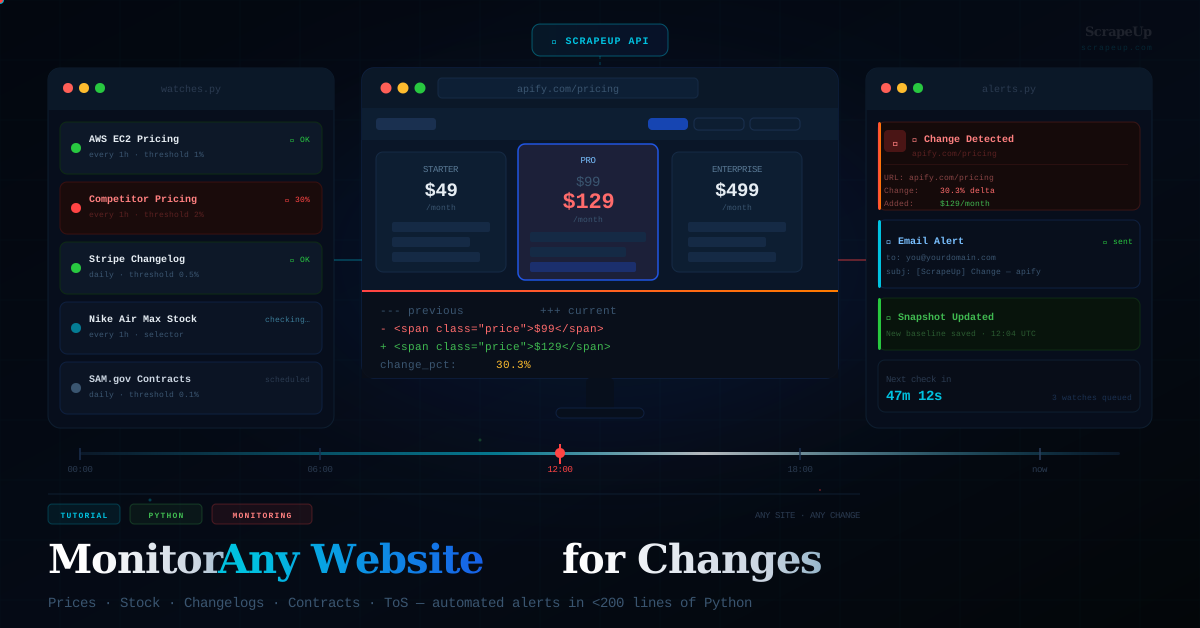
Most of the web's most valuable data isn't in a database you can query -- it's sitting on public pages that change without warning. A competitor drops their prices at 2am. A government portal posts a new contract award. A product you track goes back in stock. A terms of service page you agreed to gets quietly updated.
If you're not monitoring those pages programmatically, you're missing the signal entirely. In this tutorial, we'll build a complete website change monitor using ScrapeUp's API -- one that handles JavaScript-rendered pages, sends you Slack and email alerts, and lets you target specific elements on a page rather than diffing the whole thing.
TL;DR -- By the end of this tutorial you'll have a working website change monitor that checks any URL on a schedule, diffs the content against a previous snapshot, and alerts you by email or Slack when something changes. Works on any site -- competitor pricing pages, government procurement portals, product listings, job boards, terms of service pages, and more.
Why Website Monitoring Is Harder Than It Sounds
The naive approach -- fetch a URL, compare the HTML -- fails immediately on most modern sites. Here's why:
- Dynamic content -- ads, timestamps, session tokens, and personalized content change on every load, making straight HTML comparison useless.
- JavaScript rendering -- sites like Amazon, Nike, or any React/Vue app render their critical content after page load. A basic HTTP request gets an empty shell.
- Bot detection -- price pages, inventory pages, and government portals are heavily protected. Raw requests from a datacenter IP get blocked or served decoy content.
- Rate limiting -- check a page too frequently from one IP and you'll get throttled or banned within hours.
ScrapeUp solves all four of these at the API layer. You get rendered HTML from residential IPs with CAPTCHA solving built in -- so your monitor focuses purely on detecting the changes that matter.
How ScrapeUp's API Works
Every request runs through ScrapeUp's single endpoint. You pass a URL and optional parameters, and get back the fully rendered HTML of the page.
GET https://api.scrapeup.com?api_key=YOUR_KEY&url=TARGET_URL
Key parameters for change monitoring:
| Parameter | Required | Description |
|---|---|---|
api_key | Required | Your ScrapeUp API key from scrapeup.com |
url | Required | The fully-encoded target URL to fetch |
render | Optional | Set true to execute JavaScript before returning HTML. Required for React/Vue/SPA pages. |
premium_proxy | Optional | Set true for residential IPs -- essential for rate-limited or geo-restricted pages. |
country_code | Optional | Two-letter country code e.g. us, de, gb. |
Step 1 -- Install and Configure
Get your free API key at scrapeup.com -- 1,000 free credits/month, no credit card required. Then install the dependencies:
pip install requests beautifulsoup4 scheduleSet up your base fetch helper -- this is the only place your API key lives:
# config.py
import os, requests

API_KEY  = os.environ.get("SCRAPEUP_API_KEY", "YOUR_KEY_HERE")
BASE_URL = "https://api.scrapeup.com"

def fetch_page(url, render=False, premium=False, country=None):
    # Fetch a URL through ScrapeUp and return the HTML string.
    params = {
        "api_key": API_KEY,
        "url":     url,
        "render":  "true" if render else "false",
    }
    if premium: params["premium_proxy"] = "true"
    if country: params["country_code"]  = country

    r = requests.get(BASE_URL, params=params, timeout=30)
    r.raise_for_status()
    return r.text
Step 2 -- Snapshot Engine
Before you can detect changes, you need a snapshot of the current state. We store each page's cleaned text content in a local JSON file, keyed by a hash of the URL. Stripping HTML tags before storage gives us a clean, stable surface for diffing -- dynamic attributes and class names don't pollute the comparison.
# snapshot.py
import hashlib, json, os
from datetime import datetime
from pathlib import Path
from bs4 import BeautifulSoup

SNAPSHOT_DIR = Path("snapshots")
SNAPSHOT_DIR.mkdir(exist_ok=True)

def snapshot_key(url):
    # Turn a URL into a safe filename.
    return hashlib.md5(url.encode()).hexdigest()[:12]

def extract_text(html):
    # Strip tags and normalise whitespace for a clean diff surface.
    soup = BeautifulSoup(html, "html.parser")
    for tag in soup(["script", "style", "noscript", "meta", "link"]):
        tag.decompose()
    return " ".join(soup.get_text().split())

def save_snapshot(url, text):
    key  = snapshot_key(url)
    path = SNAPSHOT_DIR / f"{key}.json"
    data = {"url": url, "text": text, "saved_at": datetime.utcnow().isoformat()}
    path.write_text(json.dumps(data, indent=2))
    return path

def load_snapshot(url):
    path = SNAPSHOT_DIR / f"{snapshot_key(url)}.json"
    if not path.exists():
        return None
    return json.loads(path.read_text())
Step 3 -- Change Detection (Differ)
With snapshots in place, the differ compares old and new text and produces a structured report: a percentage change score, the added lines, the removed lines, and a raw unified diff. The percentage score is the key driver for filtering out noise.
# differ.py
import difflib

def compute_diff(old_text, new_text):
    # Return a structured diff summary with change percentage.
    old_lines  = old_text.split()
    new_lines  = new_text.split()
    ratio      = difflib.SequenceMatcher(None, old_lines, new_lines).ratio()
    change_pct = round((1 - ratio) * 100, 1)

    delta   = list(difflib.unified_diff(
        old_text.splitlines(), new_text.splitlines(), lineterm="", n=2))

    added   = [l[1:] for l in delta if l.startswith("+") and not l.startswith("+++")]
    removed = [l[1:] for l in delta if l.startswith("-") and not l.startswith("---")]

    return {
        "changed":     change_pct > 0,
        "change_pct":  change_pct,
        "added":       added[:20],
        "removed":     removed[:20],
        "delta_lines": delta[:60],
    }
Step 4 -- Alerts: Slack and Email
A monitor that doesn't alert you is just a log file. Here's how to wire up both Slack (using Block Kit for a rich notification) and email via SMTP. Set your credentials as environment variables before running:
# alerts.py
import smtplib, json, os
from email.mime.text      import MIMEText
from email.mime.multipart import MIMEMultipart
import urllib.request

def send_slack_alert(url, diff, webhook_url):
    additions = "
".join([f"* {l}" for l in diff["added"][:5]]) or "(no text additions)"
    payload = {
        "text": f"Change detected ({diff['change_pct']}% changed)",
        "blocks": [
            {"type": "header",
             "text": {"type": "plain_text", "text": "Website Change Detected"}},
            {"type": "section",
             "fields": [
                 {"type": "mrkdwn", "text": f"*URL:*
{url}"},
                 {"type": "mrkdwn", "text": f"*Change:*
{diff['change_pct']}%"},
             ]},
            {"type": "section",
             "text": {"type": "mrkdwn",
                      "text": f"*What changed:*
```{additions[:400]}```"}},
        ]
    }
    data = json.dumps(payload).encode()
    req  = urllib.request.Request(
        webhook_url, data=data, headers={"Content-Type": "application/json"})
    urllib.request.urlopen(req)
    print("  Slack alert sent")

def send_email_alert(url, diff, recipient):
    sender   = os.environ["ALERT_EMAIL_FROM"]
    password = os.environ["ALERT_EMAIL_PASS"]
    smtp     = os.environ.get("ALERT_SMTP_HOST", "smtp.gmail.com")
    port     = int(os.environ.get("ALERT_SMTP_PORT", 587))

    subject = f"[ScrapeUp] Change detected -- {url[:60]}"
    body    = (f"Change detected on:
{url}

"
               f"Change magnitude: {diff['change_pct']}%

"
               f"First additions:
" + "
".join(diff["added"][:5]))

    msg = MIMEMultipart()
    msg["From"]    = sender
    msg["To"]      = recipient
    msg["Subject"] = subject
    msg.attach(MIMEText(body, "plain"))

    with smtplib.SMTP(smtp, port) as server:
        server.starttls()
        server.login(sender, password)
        server.send_message(msg)
    print(f"  Email alert sent to {recipient}")
Step 5 -- The Main Monitor Loop
Now we wire everything together. The WATCHES list defines every URL to track -- its check interval, ScrapeUp rendering settings, and the change threshold that triggers an alert. Four real examples are pre-configured below:
# monitor.py -- the main engine
import schedule, time
from datetime import datetime
from config   import fetch_page
from snapshot import extract_text, save_snapshot, load_snapshot
from differ   import compute_diff
from alerts   import send_email_alert, send_slack_alert

WATCHES = [
    {
        "name":      "AWS EC2 Pricing",
        "url":       "https://aws.amazon.com/ec2/pricing/on-demand/",
        "render":    True,
        "premium":   False,
        "threshold": 1.0,
        "interval":  "hourly",
    },
    {
        "name":      "Stripe API Changelog",
        "url":       "https://stripe.com/docs/upgrades",
        "render":    False,
        "premium":   False,
        "threshold": 0.5,
        "interval":  "daily",
    },
    {
        "name":      "Competitor Pricing (Apify)",
        "url":       "https://apify.com/pricing",
        "render":    True,
        "premium":   True,
        "threshold": 2.0,
        "interval":  "daily",
    },
    {
        "name":      "Nike Air Max 90 Stock",
        "url":       "https://www.nike.com/t/air-max-90-mens-shoes",
        "render":    True,
        "premium":   True,
        "threshold": 0.5,
        "interval":  "hourly",
    },
]

SLACK_WEBHOOK = "https://hooks.slack.com/services/YOUR/WEBHOOK/URL"
ALERT_EMAIL   = "you@yourdomain.com"

def check_watch(watch):
    name      = watch["name"]
    url       = watch["url"]
    threshold = watch["threshold"]
    ts        = datetime.utcnow().strftime("%H:%M:%S UTC")
    print(f"
[{ts}] Checking: {name}")

    try:
        html     = fetch_page(url, render=watch["render"], premium=watch["premium"])
        new_text = extract_text(html)
        previous = load_snapshot(url)

        if previous is None:
            save_snapshot(url, new_text)
            print(f"  First snapshot saved for {name}")
            return

        diff = compute_diff(previous["text"], new_text)

        if diff["changed"] and diff["change_pct"] >= threshold:
            print(f"  CHANGE DETECTED: {diff['change_pct']}% delta")
            send_slack_alert(url, diff, SLACK_WEBHOOK)
            send_email_alert(url, diff, ALERT_EMAIL)
            save_snapshot(url, new_text)
        else:
            print(f"  No significant change ({diff['change_pct']}%)")

    except Exception as e:
        print(f"  Error checking {name}: {e}")


def build_schedule():
    for w in [w for w in WATCHES if w["interval"] == "hourly"]:
        schedule.every(1).hours.do(check_watch, w)
    for w in [w for w in WATCHES if w["interval"] == "daily"]:
        schedule.every().day.at("08:00").do(check_watch, w)

if __name__ == "__main__":
    print("ScrapeUp Website Monitor -- starting up")
    for w in WATCHES:
        check_watch(w)
    build_schedule()
    print("Scheduler running. Ctrl+C to stop.")
    while True:
        schedule.run_pending()
        time.sleep(30)
Threshold Tuning: Setting threshold too low on dynamic pages (ads, timestamps, user counts) will trigger false positives. Start at 2.0 for marketing pages and 0.5 for static docs or pricing tables where even a small change matters.
Step 6 -- Target a Specific CSS Selector
Full-page diffing is noisy on sites with live counts or rotating banners. The better approach for price monitoring or inventory checks is to extract only the element you care about and compare that string directly. A one-character change in a price is a 100% change in that selector's text -- which is exactly what you want to catch:
# selector_monitor.py
from bs4 import BeautifulSoup
from config import fetch_page

def extract_selector(html, css_selector):
    # Extract only the text from a specific CSS selector.
    soup = BeautifulSoup(html, "html.parser")
    el   = soup.select_one(css_selector)
    return el.get_text(strip=True) if el else "[not found]"


# Example 1: Monitor only the price on an Amazon product page
html  = fetch_page("https://www.amazon.com/dp/B0BSHF7WHW", render=True, premium=True)
price = extract_selector(html, ".a-price .a-offscreen")
print(f"Amazon price: {price}")
# Output: Amazon price: $899.00

# Example 2: Monitor the latest release tag on a GitHub repo
html    = fetch_page("https://github.com/anthropics/anthropic-sdk-python/releases")
release = extract_selector(html, ".Box-row:first-child .Link--primary")
print(f"Latest release: {release}")
# Output: Latest release: v0.26.1

# Example 3: Monitor a government contract award count
html  = fetch_page("https://sam.gov/search/?index=opp",
                   render=True, premium=True)
count = extract_selector(html, ".total-count")
print(f"Active contracts: {count}")
JavaScript-heavy pages: If extract_selector returns [not found], the element is rendered by JavaScript after page load. Switch to render=True in your fetch_page call to instruct ScrapeUp to execute JS before returning the HTML.
Bonus: Visual HTML Diff Report
For compliance monitoring or legal page tracking, this module generates a side-by-side HTML diff report you can open in any browser -- showing exactly what line changed and in what context:
# visual_diff.py
import difflib, pathlib
from datetime import datetime
from config   import fetch_page
from snapshot import extract_text, load_snapshot, save_snapshot

def html_diff_report(url, render=False):
    html     = fetch_page(url, render=render, premium=True)
    new_text = extract_text(html)
    previous = load_snapshot(url)

    if previous is None:
        save_snapshot(url, new_text)
        print("First snapshot taken -- nothing to diff yet.")
        return

    diff_html = difflib.HtmlDiff(wrapcolumn=80).make_file(
        previous["text"].splitlines(),
        new_text.splitlines(),
        fromdesc=f"Previous ({previous['saved_at'][:10]})",
        todesc=f"Current ({datetime.utcnow().date()})",
        context=True, numlines=3,
    )

    out = pathlib.Path(f"diff_report_{datetime.utcnow().strftime('%Y%m%d_%H%M')}.html")
    out.write_text(diff_html)
    print(f"Diff report saved: {out}")
    save_snapshot(url, new_text)

# Example: compare Stripe changelog from yesterday to today
html_diff_report("https://stripe.com/docs/upgrades", render=False)
Real-World Use Cases
- Competitor price monitoring -- Track pricing pages from direct competitors. Set a 1% threshold on the price selector and get a Slack ping within the hour when they change rates.
- Government contract alerts -- Monitor SAM.gov, USASPENDING, or state procurement portals for new contract awards in your category before the daily digest emails go out.
- Product restock notifications -- Watch the "Add to Cart" button selector on Nike, Supreme, or any retailer. When the text changes from "Notify Me" to "Add to Cart", fire the alert.
- API and SDK changelog tracking -- Monitor Stripe, Twilio, or OpenAI's changelog. Know about breaking changes before your on-call rotation does.
- Terms of service monitoring -- Legal and compliance teams catch ToS updates on platforms they've integrated with, triggering a review before the change takes effect.
- Real estate listing alerts -- Monitor Zillow or commercial real estate portals for new listings or price drops in a specific area or price range.
Respect robots.txt and ToS: Always review a site's terms of service before monitoring it programmatically. ScrapeUp handles the technical layer, but you remain responsible for ensuring your use case is permitted under the target site's policies.
What You Built
You now have a modular, production-ready website change monitor built on ScrapeUp's API. It handles JavaScript rendering, bot detection, and rate limiting at the infrastructure level -- so your code stays focused on extracting signal and routing alerts.
The full stack: a fetch layer (ScrapeUp), a snapshot engine, a diff engine, an alerts module, and a scheduler -- all in under 200 lines of Python. Deployable on any VPS, cloud function, or even a Raspberry Pi.
Get your free API key and run your first check in the next 10 minutes. The full API documentation covers additional parameters, response formats, and concurrency options for high-frequency monitoring.