How Companies Keep Important Scrapers Reliable
A scraper that works once is a prototype. One that works reliably for months is infrastructure. Here are the six layers that separate them — with working Python code for output validation, retry escalation, schema drift detection, alerting, and overlap-safe scheduling.
A scraper that works once is a prototype. A scraper that works reliably for months — across target site updates, proxy blocks, schema changes, and unexpected downtime — is infrastructure. Most developers only discover the difference when a dashboard goes stale, a pricing model gets fed wrong numbers, or a compliance report quietly fills with nulls.
The question "how do companies keep important scrapers reliable?" came up in r/webscraping with 65 comments, nearly all from developers who had already built scrapers and were looking to professionalize them. The consensus: reliability is not about writing better selectors. It is about building a stack of defensive layers that catch failures before they reach downstream systems.
This post covers that stack end to end. Six layers, working Python code for each, and real examples from teams running scrapers in production.
Why Scrapers Break in Production
Before building defensive layers, it helps to understand exactly how production scrapers fail — because most failures are not obvious crashes. They are silent degradations that accumulate unnoticed until something downstream breaks.
1. Silent empty results — The scraper runs, returns HTTP 200, but the page served was a login wall or CAPTCHA page. Your pipeline ingests zero records and nobody notices for days.
2. Schema drift — The target site updated its CSS classes or HTML structure. Your selectors still match, but they now return garbage values — or nothing. Your database fills with nulls.
3. IP burnout without escalation — A single proxy tier gets flagged. With no fallback logic, every subsequent request from that session fails. The scraper appears to "hang."
4. No alerting — Failures happen silently. A downstream dashboard or report built on stale data makes decisions on information that is days or weeks out of date.
5. Schedule overlap — A slow scrape run takes longer than its interval. A second instance starts before the first finishes. Duplicate records, race conditions, and data corruption follow.
The common thread across all five failure modes is that the scraper appears to work — it runs on schedule, exits with a success code, and produces output files. The failures are in the quality of the output, not its existence. That is why defensive layers must check the data, not just the process.
The Six-Layer Reliability Stack
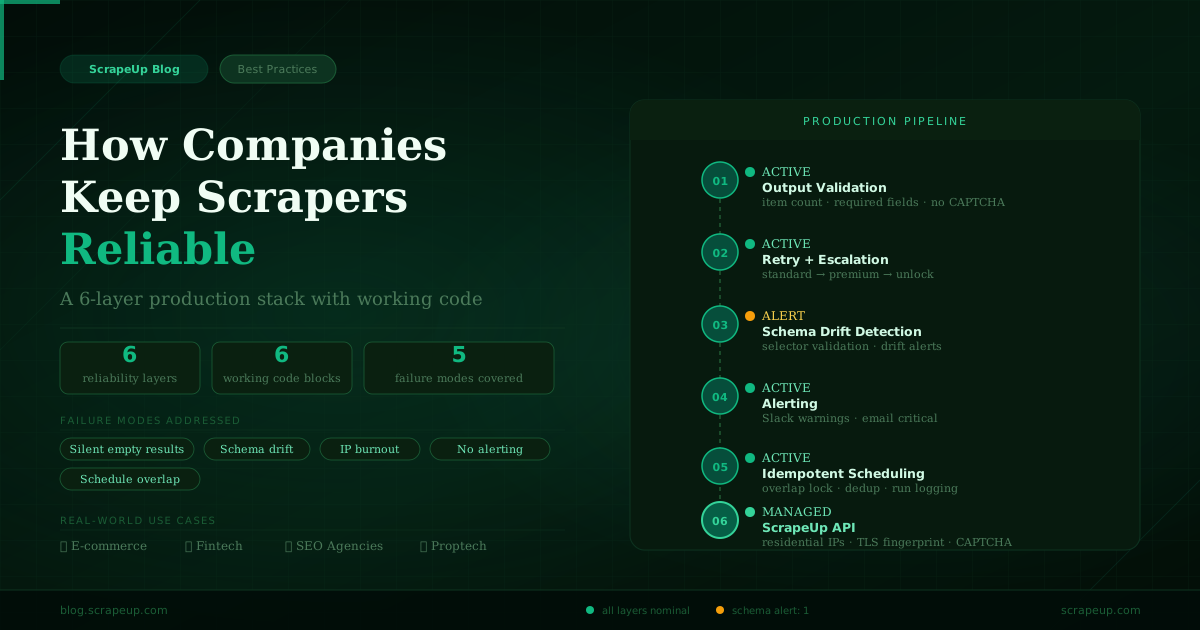
Each layer in the stack targets a specific class of failure. They work independently but compound: a scraper with all six layers can recover from anti-bot blocks, detect structural changes on the target site, alert your team before bad data reaches users, and prevent the scheduling issues that cause duplicate or missing records.
| Layer | What It Does | Without It |
|---|---|---|
| Output validation | Asserts result count, required fields, no CAPTCHA page before data enters pipeline | Silent empty-result corruption |
| Retry with escalation | Automatically escalates from standard → premium → unlock on failure | Single-tier failure, no recovery |
| Schema drift detection | Validates CSS selectors on a schedule, alerts before bad data accumulates | Nulls or wrong values silently in DB |
| Alerting | Slack + email notifications on failure, schema drift, or retry exhaustion | Failures invisible until downstream break |
| Idempotent scheduling | Overlap prevention lock, run logging, and deduplication by URL hash | Duplicate records, race conditions |
| Managed proxy layer | Residential IPs, TLS fingerprinting, session management — no infrastructure to run | Engineering time on infra, not product |
Layer 1: Output Validation
The first layer every production scraper needs is a structured check on the output before it enters any downstream system. This is not about parsing errors — it is about catching semantically empty results that look successful at the HTTP level.
A scraper that hits a CAPTCHA page returns HTTP 200 with a large HTML payload. Without output validation, that response flows into your pipeline as if it were a successful scrape. The health check below runs a set of configurable assertions on every result before it moves forward:
# health_check.py — validate scraper output before it enters your pipeline
import requests
import json
from datetime import datetime

def validate_scrape(result: dict, config: dict) -> dict:
    """
    Run a set of assertions against a scrape result.
    Returns a report with pass/fail status and any anomalies found.
    """
    checks = {
        "has_data":         bool(result.get("items")),
        "min_item_count":   len(result.get("items", [])) >= config.get("min_items", 1),
        "no_captcha_page":  "captcha" not in result.get("raw_html", "").lower(),
        "no_login_wall":    "sign in" not in result.get("raw_html", "").lower(),
        "required_fields":  all(
            all(field in item for field in config.get("required_fields", []))
            for item in result.get("items", [])
        ),
        "freshness":        result.get("scraped_at", "") >= config.get("min_date", ""),
    }

    passed = all(checks.values())
    failed = [k for k, v in checks.items() if not v]

    return {
        "passed":    passed,
        "failed":    failed,
        "timestamp": datetime.utcnow().isoformat(),
        "item_count": len(result.get("items", [])),
    }

# Example usage
config = {
    "min_items":      5,
    "required_fields": ["title", "url", "price"],
    "min_date":       "2026-01-01",
}

result = {
    "items":    [{"title": "Product A", "url": "/a", "price": "$99"}],
    "raw_html": "<html>...</html>",
    "scraped_at": "2026-03-01",
}

report = validate_scrape(result, config)
if not report["passed"]:
    print(f"SCRAPE FAILED: {report['failed']}")
else:
    print(f"OK — {report['item_count']} items validated")
Run this check immediately after every scrape. If it fails, do not write to your database. Queue the URL for retry and trigger an alert. This single layer prevents the most common class of silent data corruption in production pipelines.
Layer 2: Retry Logic with Tier Escalation
A naive retry that repeats the same request with the same parameters against a blocked IP will fail every time. Production retry logic needs two things that most implementations miss: exponential backoff with jitter to avoid thundering-herd collisions, and tier escalation that automatically upgrades the proxy and browser fingerprint on each failed attempt.
ScrapeUp has three tiers — standard, premium (residential), and unlock (full CAPTCHA solver) — that map naturally to an escalating retry sequence:
# resilient_scraper.py — exponential backoff with jitter and escalation tiers
import requests
import time
import random
import logging
from typing import Optional

logging.basicConfig(level=logging.INFO)
log = logging.getLogger("scraper")

API_KEY = "your_scrapeup_key"

def scrape_with_retry(
    url: str,
    max_attempts: int = 4,
    base_delay:   float = 2.0,
    use_premium:  bool = True,
) -> Optional[str]:
    """
    Tier-escalating retry strategy:
      Attempt 1: standard proxy
      Attempt 2: premium residential proxy
      Attempt 3: premium + longer delay
      Attempt 4: unlock (CAPTCHA solver + full browser fingerprint)
    """
    for attempt in range(1, max_attempts + 1):
        # Escalate proxy tier as attempts increase
        params = {"api_key": API_KEY, "url": url}
        if attempt >= 2:
            params["premium"] = "true"
        if attempt >= 4:
            params["unlock"] = "true"
            params.pop("premium", None)

        try:
            log.info(f"Attempt {attempt}/{max_attempts}: {url[:60]}")
            r = requests.get("https://api.scrapeup.com", params=params, timeout=90)

            if r.status_code == 200 and len(r.text) > 1000:
                log.info(f"Success on attempt {attempt} ({len(r.text):,} bytes)")
                return r.text

            if r.status_code == 429:
                log.warning("Rate limited — backing off longer")
                time.sleep(base_delay * (2 ** attempt) + random.uniform(0, 2))
                continue

            log.warning(f"HTTP {r.status_code} on attempt {attempt}")

        except requests.exceptions.Timeout:
            log.warning(f"Timeout on attempt {attempt}")

        # Exponential backoff with jitter
        delay = base_delay * (2 ** (attempt - 1)) + random.uniform(0, 1)
        log.info(f"Waiting {delay:.1f}s before next attempt")
        time.sleep(delay)

    log.error(f"All {max_attempts} attempts failed for {url}")
    return None
The jitter in the delay calculation is important at scale. If you are running 50 concurrent scrapers and they all hit a rate limit simultaneously, synchronized retries will hit the same wall in lockstep. Randomising the delay spreads the retry load and dramatically improves recovery rates.
Layer 3: Schema Drift Detection
Target sites update their HTML structures constantly. A CSS class rename, a tag hierarchy change, or a new JavaScript-rendered section can silently break a selector that has worked for months. Schema drift is insidious because it does not throw an error — your scraper happily returns empty strings or None values that flow into your database undetected.
The solution is a scheduled schema check that runs independently of your main scraper and validates that all critical selectors still match on a sample page. When drift is detected, it triggers an alert before the corrupted data accumulates:
# schema_monitor.py — detect when a target site's HTML structure has changed
from bs4 import BeautifulSoup
import requests
import hashlib
import json
from datetime import datetime

API_KEY = "your_scrapeup_key"

# Expected selectors — update these when the site changes
SCHEMA = {
    "product_title":   "h1.product-title, h1[data-test='product-name']",
    "product_price":   "span.price, [data-price], .product-price",
    "product_rating":  "div.rating, span[itemprop='ratingValue']",
    "product_reviews": "span.review-count, [data-review-count]",
}

def extract_fields(html: str) -> dict:
    soup = BeautifulSoup(html, "html.parser")
    return {
        field: bool(soup.select_one(selector))
        for field, selector in SCHEMA.items()
    }

def check_schema_drift(url: str, expected: dict) -> dict:
    r = requests.get("https://api.scrapeup.com", params={
        "api_key": API_KEY, "url": url, "premium": "true"
    }, timeout=90)

    found    = extract_fields(r.text)
    missing  = [f for f, present in found.items() if not present]
    drifted  = len(missing) > 0

    report = {
        "url":       url,
        "checked_at": datetime.utcnow().isoformat(),
        "drifted":   drifted,
        "missing_fields": missing,
        "all_fields": found,
    }

    if drifted:
        print(f"SCHEMA DRIFT DETECTED on {url}")
        print(f"Missing selectors: {missing}")
        # Trigger alert here: Slack, PagerDuty, email, etc.
    else:
        print(f"Schema OK — all {len(found)} fields present")

    return report

check_schema_drift("https://example.com/product/123", SCHEMA)
Run schema checks at a different cadence than your main scraper — daily validation is usually sufficient unless the target site updates frequently. Major e-commerce platforms like Amazon and Walmart update their HTML multiple times per quarter. News and government sites tend to be more stable but can have sudden full redesigns.
Layer 4: Alerting
Reliability without visibility is not reliability — it is unmonitored fragility. Every production scraper should have at least one outbound alert channel configured for critical failures. The most effective setup combines a Slack notification for warnings (schema drift, high retry rate) and an email alert for critical failures (pipeline down, validation failing on all runs).
# alerting.py — Slack + email alerts for scraper failures
import requests
import smtplib
from email.message import EmailMessage
from datetime import datetime
from typing import Literal

SLACK_WEBHOOK = "https://hooks.slack.com/services/YOUR/WEBHOOK/URL"
ALERT_EMAIL   = "eng-alerts@yourcompany.com"
SMTP_HOST     = "smtp.yourprovider.com"
SMTP_USER     = "alerts@yourcompany.com"
SMTP_PASS     = "your_smtp_password"

AlertLevel = Literal["warning", "critical"]

def send_slack_alert(message: str, level: AlertLevel = "warning") -> None:
    emoji = ":warning:" if level == "warning" else ":red_circle:"
    payload = {
        "text": f"{emoji} *Scraper Alert* [{level.upper()}]\n{message}\n_Triggered at {datetime.utcnow().isoformat()} UTC_"
    }
    try:
        r = requests.post(SLACK_WEBHOOK, json=payload, timeout=10)
        r.raise_for_status()
    except Exception as e:
        print(f"Slack alert failed: {e}")

def send_email_alert(subject: str, body: str) -> None:
    msg = EmailMessage()
    msg["Subject"] = f"[Scraper Alert] {subject}"
    msg["From"]    = SMTP_USER
    msg["To"]      = ALERT_EMAIL
    msg.set_content(body)
    try:
        with smtplib.SMTP_SSL(SMTP_HOST, 465) as smtp:
            smtp.login(SMTP_USER, SMTP_PASS)
            smtp.send_message(msg)
    except Exception as e:
        print(f"Email alert failed: {e}")

def alert(message: str, level: AlertLevel = "warning") -> None:
    """Send alert via all configured channels."""
    send_slack_alert(message, level)
    if level == "critical":
        send_email_alert(subject=message[:80], body=message)

# Example triggers
# alert("Amazon product scraper: 0 results returned (expected 20+)", "critical")
# alert("Schema drift detected on target site — price selector missing", "warning")
# alert("Retry budget exhausted after 4 attempts — URL queued for manual review", "warning")
The alert taxonomy matters. Not every failure warrants a 2am email. A good rule of thumb: a single failed run is a warning; two consecutive failed runs on the same URL is critical; schema drift on a high-value target is critical. Calibrate thresholds to your business's tolerance for stale data.
Layer 5: The Full Production Pipeline
The previous four layers combine into a single production scraper class. This is the pattern we recommend for any scraper that runs on a schedule and feeds a downstream system. It is not a framework — it is a template you copy and adapt per target:
# production_scraper.py — production-grade scraper with all reliability layers
import requests
import time
import random
import logging
import hashlib
from datetime import datetime
from typing import Optional
from bs4 import BeautifulSoup

log = logging.getLogger("scraper.production")
API_KEY = "your_scrapeup_key"

# ── Config ────────────────────────────────────────────────────────────────────
PIPELINE_CONFIG = {
    "min_items":       10,
    "required_fields": ["title", "price", "url"],
    "max_retries":     4,
    "base_delay":      2.0,
    "alert_on_fail":   True,
}

# ── Scrape with tier escalation ───────────────────────────────────────────────
def fetch(url: str, attempt: int = 1) -> Optional[str]:
    params = {"api_key": API_KEY, "url": url}
    if attempt >= 2: params["premium"] = "true"
    if attempt >= 4: params["unlock"]  = "true"; params.pop("premium", None)

    r = requests.get("https://api.scrapeup.com", params=params, timeout=90)
    return r.text if r.status_code == 200 and len(r.text) > 500 else None

# ── Parse with fallback selectors ────────────────────────────────────────────
def parse_products(html: str) -> list:
    soup = BeautifulSoup(html, "html.parser")
    results = []
    for item in soup.select("div.product-item, li.product, article.product"):
        title_el = item.select_one("h2, h3, .product-title, [data-name]")
        price_el = item.select_one(".price, [data-price], span.amount")
        link_el  = item.select_one("a[href]")
        if title_el and price_el:
            results.append({
                "title": title_el.get_text(strip=True),
                "price": price_el.get_text(strip=True),
                "url":   link_el["href"] if link_el else "",
            })
    return results

# ── Validate output ───────────────────────────────────────────────────────────
def validate(items: list, config: dict) -> bool:
    if len(items) < config["min_items"]: return False
    for item in items:
        if not all(item.get(f) for f in config["required_fields"]): return False
    return True

# ── Main pipeline ─────────────────────────────────────────────────────────────
def run_scrape(url: str) -> dict:
    html, items = None, []

    for attempt in range(1, PIPELINE_CONFIG["max_retries"] + 1):
        html = fetch(url, attempt)
        if html:
            items = parse_products(html)
            if validate(items, PIPELINE_CONFIG):
                log.info(f"Success: {len(items)} items from {url}")
                return {"status": "ok", "items": items, "attempts": attempt}
            log.warning(f"Validation failed on attempt {attempt}: {len(items)} items")
        delay = PIPELINE_CONFIG["base_delay"] * (2 ** (attempt - 1)) + random.uniform(0, 1)
        time.sleep(delay)

    log.error(f"Pipeline failed after {PIPELINE_CONFIG['max_retries']} attempts: {url}")
    return {"status": "failed", "items": [], "attempts": PIPELINE_CONFIG["max_retries"]}

result = run_scrape("https://example.com/products")
print(f"Status: {result['status']} | Items: {len(result['items'])} | Attempts: {result['attempts']}")
Notice that the pipeline returns a structured dict with status, item count, and attempt number. This makes it easy to log run outcomes, track success rates over time, and build simple dashboards showing scraper health without any external monitoring infrastructure.
Layer 6: Idempotent Scheduling
The final layer addresses a failure mode that only appears in production: what happens when a scrape job takes longer than its scheduled interval. Without overlap prevention, a 6-hour scrape that occasionally takes 7 hours will spawn a second instance before the first completes — leading to duplicate records, write conflicts, and silent data corruption.
The scheduler below uses a threading lock for overlap prevention, registers all jobs at startup, and runs an immediate first pass so you do not wait for the first interval before getting data:
# scheduler.py — cron-style scheduling with overlap prevention and run logging
import schedule
import time
import threading
import logging
from datetime import datetime
from production_scraper import run_scrape

log = logging.getLogger("scheduler")
_lock = threading.Lock()

JOBS = [
    {"name": "product_catalog",  "url": "https://example.com/products",   "interval_hours": 6},
    {"name": "competitor_prices","url": "https://competitor.com/pricing",  "interval_hours": 12},
    {"name": "serp_rankings",    "url": "https://www.google.com/search?q=your+keyword", "interval_hours": 24},
]

def run_job(job: dict) -> None:
    """Run a scrape job with overlap prevention."""
    if not _lock.acquire(blocking=False):
        log.warning(f"Job '{job['name']}' skipped — previous run still active")
        return
    try:
        log.info(f"Starting job: {job['name']}")
        result = run_scrape(job["url"])
        log.info(f"Job '{job['name']}' done: {result['status']} — {len(result['items'])} items")
        # Write to your database / data store here
    finally:
        _lock.release()

# Register all jobs
for job in JOBS:
    schedule.every(job["interval_hours"]).hours.do(run_job, job=job)
    log.info(f"Scheduled '{job['name']}' every {job['interval_hours']}h")

# Run immediately on startup, then on schedule
for job in JOBS:
    run_job(job)

while True:
    schedule.run_pending()
    time.sleep(60)
For multi-machine deployments, replace the threading lock with a distributed lock — Redis SETNX works well for this. The principle is the same: before starting a job, check that no other instance of that job is already running, and skip if it is.
Real-World Examples: What This Looks Like in Practice
These patterns are not theoretical. Here is how teams across different industries have implemented production-grade scraping reliability:
A mid-market retailer runs hourly price scrapes across 12 competitor sites. They use output validation to catch login walls, schema monitoring to detect Amazon's quarterly HTML changes, and Slack alerts when any scraper returns under 80% of expected results. Their pricing team reprioritises daily based on the data — no manual checking.
A fintech startup scrapes regulatory filing pages, earnings dates, and press release feeds daily. Their pipeline uses retry escalation to handle government sites that block datacenter IPs, schema validation to catch when a regulator reformat their pages, and idempotent scheduling to prevent duplicate records in their compliance database.
A digital agency runs keyword rank tracking for 40 clients, scraping Google daily across multiple geographies. They use tier escalation to handle Google's rotating CAPTCHA challenges, daily schema checks on their parsing logic, and a run-logging system that lets account managers see the freshness of any client's data at a glance.
A proptech company tracks listing inventory and price changes across Zillow, Redfin, and Realtor.com. Sites with aggressive anti-bot measures (especially Realtor.com) require premium proxies on every request. They use schema drift detection to catch the frequent CSS updates on listing pages — which can silently zero out entire data fields without it.
The Build vs. Buy Decision for the Infrastructure Layer
Everything above addresses the application-layer reliability of your scraper — validation, retry logic, schema monitoring, alerting, scheduling. These are worth building yourself because they are specific to your data model and business logic.
The infrastructure layer — residential proxies, TLS fingerprinting, session management, CAPTCHA solving — is a different calculation. The engineering cost of maintaining this infrastructure is not a one-time build; it is ongoing maintenance as anti-bot systems evolve. In 2025, Cloudflare, Akamai, and PerimeterX all made significant changes to their detection models. Teams running their own proxy infrastructure spent weeks each quarter on updates that added no business value.
ScrapeUp abstracts the entire infrastructure layer into a single API parameter. Your scraper code stays focused on what to extract and how to validate it — not on which proxy pool to use or how to match the latest Chrome TLS fingerprint. The six reliability layers in this post plug directly into ScrapeUp's API with no changes to the retry and validation logic.
Monitoring Scraper Health Over Time
Once your reliability stack is in place, the next step is trending the data it produces. Log the outcome of every run — status, item count, attempt number, and duration — to a simple database table or even a CSV. After two weeks you have enough data to set meaningful alert thresholds: what is a normal item count for this scraper, what retry rate indicates a proxy issue versus a site change, and when does a slow run warrant investigation versus being within normal variance.
Simple SQL queries on run logs will surface patterns that are invisible in individual runs: a scraper that succeeds on attempts 3 or 4 consistently is telling you its target site is getting harder to scrape and may need a proxy tier upgrade before it starts failing completely. A scraper whose item counts trend down over weeks is accumulating schema drift that partial selector matches are hiding.
Add a reliable managed scraping layer in under 30 minutes
The production pipeline in this post works with ScrapeUp's API out of the box. Free accounts include 1,000 credits per month — enough to run all six reliability layers against real targets before you commit to a plan.
Get Your Free API Key