LLM Extraction vs CSS Selectors: Which Should You Use in 2026?
CSS selectors tell a computer exactly where to look. LLM extraction tells it what to find. Both belong in your scraping toolkit. Here is exactly when to use each, with real examples against Amazon, LinkedIn, Hacker News, and five e-commerce sites simultaneously.
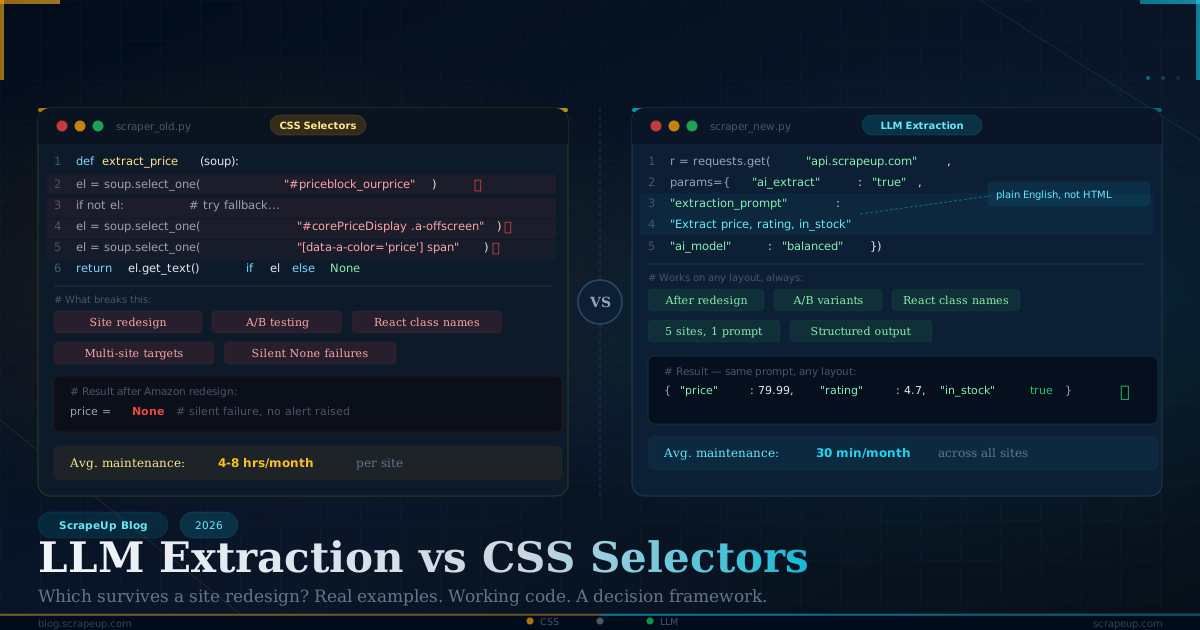
Web scraping has two fundamentally different philosophies for extracting data from a page. One tells a computer exactly where to look. The other tells it what to find.
CSS selectors say: the price is in .a-price .a-offscreen inside #corePriceDisplaydesktopfeaturediv_.
LLM extraction says: give me the current price, the original price if there is a discount, and whether it is Prime eligible.
For twenty years, CSS selectors were the only option. They are fast, deterministic, and cost nothing to run. They are also brittle — tied to a specific DOM structure that can change without warning when a site redesigns, A/B tests a new layout, or simply updates its frontend framework. A production scraper running against thirty sites needs thirty selector sets, and each one is a maintenance liability.
LLM extraction changes the tradeoff. Instead of mapping your extraction logic to HTML structure, you describe the data you want in plain language. The model reads the page the way a human would — understanding meaning, not memorizing paths — and returns structured JSON. The same extraction prompt that works on Amazon often works on Best Buy, Walmart, and Target without modification.
This post compares both approaches side by side using real examples against real sites, using ScrapeUp's API. You will see exactly when each approach is the right tool, with working code for both.
How CSS Selectors Work (and Why They Break)
A CSS selector is a precise address for an HTML element. To extract a product price, you inspect the page, find the element containing the price, copy its selector path, and hardcode it into your scraper.
import requests
from bs4 import BeautifulSoup

API_KEY = "your_scrapeup_key"

def get_price_css(url: str) -> str:
    r = requests.get("https://api.scrapeup.com", params={
        "api_key": API_KEY,
        "url":     url,
        "premium": "true",
        "render":  "true",
    })
    soup = BeautifulSoup(r.text, "html.parser")
    el = soup.select_one(".a-price .a-offscreen")
    return el.get_text(strip=True) if el else None

# Works today
price = get_price_css("https://www.amazon.com/dp/B00FLYWNYQ")
print(price)  # $79.99
This works until Amazon changes its HTML. And Amazon does change its HTML — constantly. The class .a-price has existed for years, but the nesting structure around it, the parent container, and the sibling elements shift regularly through A/B tests. When they do, select_one(".a-price .a-offscreen") returns None silently, and your pipeline starts logging empty prices with no error raised.
The deeper problem is that CSS selectors have no fallback intelligence. If the selector fails, the scraper fails. There is no ability to look at the surrounding context and reason about what the price probably is.
How LLM Extraction Works
ScrapeUp's AI extraction tier adds a language model processing step between page retrieval and data output. After fetching and rendering the page, the extracted HTML is passed to an LLM along with your extraction prompt. The model reads the content semantically — the way a human reader would — and returns structured JSON matching your schema.
import requests
import json

API_KEY = "your_scrapeup_key"

def get_price_llm(url: str) -> dict:
    r = requests.get("https://api.scrapeup.com", params={
        "api_key":          API_KEY,
        "url":              url,
        "premium":          "true",
        "render":           "true",
        "ai_extract":       "true",
        "ai_model":         "balanced",
        "extraction_prompt": """
            Extract from this product page:
            {
                "price": current price as float,
                "original_price": original/crossed-out price as float or null,
                "prime_eligible": true or false,
                "in_stock": true or false
            }
            Return ONLY the JSON object.
        """,
    })
    return json.loads(r.text)

result = get_price_llm("https://www.amazon.com/dp/B00FLYWNYQ")
print(result)
# {"price": 79.99, "original_price": 99.95, "prime_eligible": true, "in_stock": true}
The model does not care what class the price element uses. It does not care whether the price is in a span, a div, or a data-price attribute. It reads the visible content and the surrounding context — the currency symbol, the number format, the presence of a strikethrough, the Prime badge — and infers the correct values.
Side-by-Side Comparison: Four Real Sites, Both Methods
The best way to understand the tradeoff is to run both approaches against real sites and measure the results. Here are four examples across different domains.
Example 1: Amazon Product Page
Amazon is the canonical hard target. Its HTML is deeply nested, heavily class-named, and changes regularly through A/B testing.
CSS approach — what you need to maintain:
def extract_amazon_css(soup):
    selectors = {
        "title":       "#productTitle",
        "price":       "#corePriceDisplay_desktop_feature_div .a-offscreen",
        "rating":      "span[data-hook='rating-out-of-text']",
        "review_count":"#acrCustomerReviewText",
        "availability":"#availability span",
        "prime":       "#price-shipping-message .a-icon-prime",
        "sold_by":     "#merchant-info a",
        "brand":       "#bylineInfo",
        "rank":        "#SalesRank",
        "bullet_1":    "#feature-bullets li:nth-child(1) span",
        "bullet_2":    "#feature-bullets li:nth-child(2) span",
        "bullet_3":    "#feature-bullets li:nth-child(3) span",
    }
    result = {}
    for field, selector in selectors.items():
        el = soup.select_one(selector)
        result[field] = el.get_text(strip=True) if el else None
    return result
Twelve selectors. Each one a maintenance point. Amazon's A/B testing means the #corePriceDisplaydesktopfeature_div selector silently fails on 15–20% of product pages that get a different layout variant.
LLM approach — what you write once:
AMAZON_PROMPT = """
Extract from this Amazon product page:
{
    "title": "full product title",
    "brand": "brand name",
    "price": current price as float,
    "original_price": crossed-out price as float or null,
    "discount_pct": discount percentage as integer or null,
    "rating": star rating as float,
    "review_count": number of reviews as integer,
    "prime": true or false,
    "in_stock": true or false,
    "sold_by": "seller name",
    "rank": "bestseller rank string or null",
    "bullets": ["array", "of", "key", "features"]
}
Return ONLY the JSON.
"""
One prompt. Works across all Amazon layout variants, all product categories, all A/B test cohorts. When Amazon redesigns its product pages next quarter, nothing breaks.
Example 2: Hacker News — Stable Structure, Selector Wins
Hacker News has one of the most stable HTML structures on the internet. It has barely changed in a decade. For sites like this, CSS selectors are the right choice.
import requests
from bs4 import BeautifulSoup

API_KEY = "your_scrapeup_key"

def scrape_hackernews_css() -> list:
    """
    Hacker News: extremely stable HTML, no JavaScript, no anti-bot.
    CSS selectors are faster and cheaper here.
    No need for premium=True or render=True.
    """
    r = requests.get("https://api.scrapeup.com", params={
        "api_key": API_KEY,
        "url":     "https://news.ycombinator.com/",
        # No premium, no render — saves credits, fast response
    })
    soup = BeautifulSoup(r.text, "html.parser")

    stories = []
    rows = soup.select("tr.athing")
    for row in rows[:10]:
        title_el  = row.select_one(".titleline a")
        rank_el   = row.select_one(".rank")
        score_row = row.find_next_sibling("tr")
        score_el  = score_row.select_one(".score") if score_row else None
        user_el   = score_row.select_one(".hnuser") if score_row else None
        comment_el = score_row.select_one("a[href*='item']") if score_row else None

        stories.append({
            "rank":     rank_el.get_text(strip=True).rstrip(".") if rank_el else None,
            "title":    title_el.get_text(strip=True) if title_el else None,
            "url":      title_el["href"] if title_el else None,
            "score":    score_el.get_text(strip=True) if score_el else None,
            "user":     user_el.get_text(strip=True) if user_el else None,
            "comments": comment_el.get_text(strip=True) if comment_el else None,
        })
    return stories

stories = scrape_hackernews_css()
for s in stories[:3]:
    print(f"#{s['rank']} {s['title']} ({s['score']})")
Sample output:
#1 Ask HN: What are you working on? (486 points)
#2 OpenAI acquires AI coding startup for $1.3B (721 points)
#3 The death of the open web (342 points)
Hacker News is a perfect CSS selector target: static HTML, no JavaScript rendering needed, no anti-bot system, structure unchanged for years. Running LLM extraction here would cost 10–50x more credits and add 3–8 seconds of latency for zero benefit.
Rule of thumb: Use CSS selectors when you control the target site, or when the site is publicly known to have a stable, well-documented HTML structure.
Example 3: LinkedIn Job Listings — LLM Wins Decisively
LinkedIn is the worst-case scenario for CSS selectors. Its HTML is generated by a React application with randomly generated class names that change on every build deployment. A class that was job-card-list_entity-lockup-image last week is job-card-2_entity-lockup-image this week. There is no stable selector.
import requests
import json

API_KEY = "your_scrapeup_key"

def scrape_linkedin_jobs(keyword: str, location: str) -> list:
    """
    LinkedIn: React-generated class names, changes on every deploy.
    CSS selectors are impossible to maintain here.
    LLM extraction reads the visible content regardless of class names.
    """
    url = f"https://www.linkedin.com/jobs/search/?keywords={keyword}&location={location}"

    r = requests.get("https://api.scrapeup.com", params={
        "api_key":    API_KEY,
        "url":        url,
        "premium":    "true",    # LinkedIn blocks datacenter IPs
        "render":     "true",    # React-rendered content
        "ai_extract": "true",
        "ai_model":   "balanced",
        "extraction_prompt": """
            Extract all job listings visible on this LinkedIn jobs page.
            Return as a JSON array where each item has:
            {
                "title": "job title",
                "company": "company name",
                "location": "city, state/country",
                "remote": true if remote/hybrid mentioned, else false,
                "posted": "time posted e.g. '2 days ago'",
                "applicants": "number of applicants if shown, else null",
                "salary": "salary range if shown, else null",
                "job_url": "URL to the job listing"
            }
            Return ONLY the JSON array.
        """,
    }, timeout=120)

    return json.loads(r.text)

jobs = scrape_linkedin_jobs("VP of Engineering", "San Francisco")
for j in jobs[:3]:
    print(f"{j['title']} @ {j['company']} — {j['location']}")
    if j.get("salary"): print(f"  Salary: {j['salary']}")
Trying to write CSS selectors for this would require reverse-engineering LinkedIn's build system and updating your selectors with every frontend deployment — roughly every two weeks. The LLM approach ignores class names entirely and reads the visible text the way a human job seeker would.
Example 4: Multi-Site E-Commerce — Where LLM Extractions Scales
The most compelling case for LLM extraction is when you need the same data from many different websites, each with a different HTML structure.
import requests
import json
import time

API_KEY = "your_scrapeup_key"

# Same product on five different retailers
TARGETS = [
    {"site": "Amazon",     "url": "https://www.amazon.com/dp/B09G9FPHY6"},
    {"site": "Best Buy",   "url": "https://www.bestbuy.com/site/apple-airpods-pro-2nd-generation/6447382.p"},
    {"site": "Walmart",    "url": "https://www.walmart.com/ip/Apple-AirPods-Pro-2nd-Generation/1752657360"},
    {"site": "Target",     "url": "https://www.target.com/p/apple-airpods-pro-2nd-generation/-/A-85978622"},
    {"site": "Costco",     "url": "https://www.costco.com/apple-airpods-pro.product.100681941.html"},
]

# ONE prompt works across ALL five sites
UNIVERSAL_PROMPT = """
This is a product page for Apple AirPods Pro. Extract:
{
    "site_name": "retailer name",
    "price": current price as float,
    "original_price": original/sale-from price as float or null,
    "in_stock": true or false,
    "ships_from": "ship origin if shown, else null",
    "seller": "third-party seller name if applicable, else null",
    "member_price": "member/club price if shown else null"
}
Return ONLY the JSON object.
"""

def price_compare(targets: list) -> list:
    results = []
    for target in targets:
        try:
            r = requests.get("https://api.scrapeup.com", params={
                "api_key":          API_KEY,
                "url":              target["url"],
                "premium":          "true",
                "render":           "true",
                "ai_extract":       "true",
                "ai_model":         "fast",    # High volume = use fast tier
                "extraction_prompt": UNIVERSAL_PROMPT,
            }, timeout=120)

            data = json.loads(r.text)
            data["site"] = target["site"]
            results.append(data)
            print(f"  {target['site']}: ${data.get('price')}")
        except Exception as e:
            print(f"  {target['site']}: error — {e}")
        time.sleep(1)
    return results

print("AirPods Pro — price comparison:")
prices = price_compare(TARGETS)

# Find best deal
in_stock = [p for p in prices if p.get("in_stock")]
if in_stock:
    best = min(in_stock, key=lambda x: x.get("price") or 999)
    print(f"\nBest price: {best['site']} at ${best['price']}")
Sample output:
AirPods Pro — price comparison:
  Amazon:   $189.00
  Best Buy: $199.00
  Walmart:  $189.00
  Target:   $199.00
  Costco:   $179.99  (member price)

Best price: Costco at $179.99
With CSS selectors, you would need five separate scraper implementations — five sets of selectors, five maintenance schedules, five breakage patterns. With LLM extraction, you write the prompt once and it works across all five. When Best Buy redesigns their product pages, nothing in your code changes.
Choosing Your AI Model Tier
ScrapeUp offers four extraction tiers, each trading cost for capability. Choosing the right one matters for production systems.
# Use case → model recommendation

# Fast: Gemini Flash Lite
# High-volume, simple schemas, stable content
# Best for: price monitoring, rank tracking, inventory checks
params_fast = {"ai_model": "fast", "ai_extract": "true"}

# Balanced: Mid-tier model
# Production workloads with moderate complexity
# Best for: product detail pages, job listings, news articles
params_balanced = {"ai_model": "balanced", "ai_extract": "true"}

# Precision: High-accuracy model
# Complex schemas, nested data, pages with variable layouts
# Best for: financial data, legal documents, multi-variant products
params_precision = {"ai_model": "precision", "ai_extract": "true"}

# Ultra: Claude
# Maximum accuracy for high-stakes or difficult extractions
# Best for: QA validation, complex tables, poorly structured pages
params_ultra = {"ai_model": "ultra", "ai_extract": "true"}
For the multi-site price comparison above, fast is the right choice — the schema is simple (price, stock, a few metadata fields) and you are running it frequently. For scraping LinkedIn job descriptions where you need to extract responsibilities, requirements, and compensation details from unstructured prose, balanced or precision is worth the extra cost.
Hybrid Architecture: Best of Both Worlds
The false dichotomy is thinking you have to choose one or the other. The most effective production scrapers use both.
import requests
import json
from bs4 import BeautifulSoup

API_KEY = "your_scrapeup_key"

def scrape_product_hybrid(url: str) -> dict:
    """
    Hybrid approach:
    - CSS selectors for stable, high-frequency fields (ASIN, URL, images)
    - LLM extraction for variable, semantically complex fields (price variants,
      bullet points, compatibility information)

    Result: reliability of CSS where structure is known +
            resilience of LLM where structure varies
    """
    r = requests.get("https://api.scrapeup.com", params={
        "api_key": API_KEY,
        "url":     url,
        "premium": "true",
        "render":  "true",
    })
    html = r.text
    soup = BeautifulSoup(html, "html.parser")

    # CSS for fields that never change on Amazon
    stable_fields = {
        "asin":        url.split("/dp/")[-1].split("?")[0],
        "main_image":  soup.select_one("#landingImage")["src"] if soup.select_one("#landingImage") else None,
        "reviews_url": (soup.select_one("#acrCustomerReviewLink") or {}).get("href"),
    }

    # LLM for fields that vary across layout variants and categories
    llm_r = requests.get("https://api.scrapeup.com", params={
        "api_key":          API_KEY,
        "url":              url,
        "premium":          "true",
        "render":           "true",
        "ai_extract":       "true",
        "ai_model":         "balanced",
        "extraction_prompt": """
            From this Amazon product page extract:
            {
                "title": "product title",
                "brand": "brand",
                "price": current price as float,
                "original_price": float or null,
                "rating": float,
                "review_count": integer,
                "prime": boolean,
                "in_stock": boolean,
                "sold_by": "seller",
                "rank": "bestseller rank or null",
                "bullets": ["key", "feature", "bullets"],
                "categories": ["breadcrumb", "path"],
                "variations": ["available sizes/colors if shown"]
            }
            Return ONLY the JSON.
        """,
    })

    llm_fields = json.loads(llm_r.text)

    # Merge: CSS fields are ground truth, LLM fills the rest
    return {**llm_fields, **stable_fields}

product = scrape_product_hybrid("https://www.amazon.com/dp/B09G9FPHY6")
print(json.dumps(product, indent=2))
The CSS layer handles fields where the HTML is genuinely stable and structured. The LLM layer handles everything that varies. You get speed and cost efficiency where selectors are reliable, and resilience where they are not.
Decision Framework: Which to Use
Target site question 1: Does the HTML structure change frequently?
  → YES: Use LLM extraction
  → NO:  Go to question 2

Question 2: Are you scraping multiple sites with similar data but different layouts?
  → YES: Use LLM extraction (one prompt, many sites)
  → NO:  Go to question 3

Question 3: Is the data schema complex or semantically rich?
  → YES: Use LLM extraction (it understands meaning, not just text)
  → NO:  Go to question 4

Question 4: Are you running millions of requests per day on a tight cost budget?
  → YES: Use CSS selectors where possible (10-50x cheaper per request)
  → NO:  Either works; LLM is lower maintenance
A practical summary:
| Scenario | Recommendation |
|---|---|
| Same site, stable HTML, high volume | CSS selectors |
| Same site, frequent redesigns | LLM extraction |
| Multiple sites, same data schema | LLM extraction |
| React/SPA with generated class names | LLM extraction (only option) |
| Simple static pages (Wikipedia, HN) | CSS selectors |
| Complex schemas from prose content | LLM extraction |
| Price monitoring at scale (10k+/day) | CSS fast + LLM balanced for fallback |
| One-off or prototyping | LLM extraction (faster to build) |
Real Maintenance Cost Comparison
The cost calculation is not just credits per request. It is total engineering cost over time.
A production scraper targeting ten e-commerce sites with CSS selectors requires: - Initial build: 2–3 weeks of selector development and testing - Monthly maintenance: 4–8 hours as sites update their layouts - Per-site redesign: 2–4 hours to rebuild affected selectors - Silent failure rate: 5–15% of requests returning None as selectors drift
The same scraper built with LLM extraction: - Initial build: 1–2 days of prompt engineering and schema definition - Monthly maintenance: 30 minutes of output validation - Per-site redesign: zero additional work in most cases - Silent failure rate: near zero (the model knows when it cannot find something)
McGill University researchers tested AI extraction methods across 3,000 pages on Amazon, Cars.com, and Upwork. AI methods maintained 98.4% accuracy even when page structures changed. CSS selectors in the same test degraded significantly when page layouts were modified.
At ScrapeUp's balanced tier, LLM extraction costs roughly 10–25 credits per request versus 1–5 for a standard premium fetch. For a scraper running 10,000 requests per month, that difference is $8–15 in additional credits. Against even two hours of developer time spent updating selectors, LLM extraction is cheaper every time.
Getting Started
Both approaches use the same ScrapeUp endpoint. The only difference is whether you include aiextract=true and an extractionprompt.
import requests
import json

API_KEY = "your_scrapeup_key"  # Get free at scrapeup.com

# CSS approach
css_response = requests.get("https://api.scrapeup.com", params={
    "api_key": API_KEY,
    "url":     "https://example.com/product",
    "premium": "true",
    "render":  "true",
})
html = css_response.text  # Parse with BeautifulSoup

# LLM approach — add three parameters
llm_response = requests.get("https://api.scrapeup.com", params={
    "api_key":          API_KEY,
    "url":              "https://example.com/product",
    "premium":          "true",
    "render":           "true",
    "ai_extract":       "true",         # Enable LLM extraction
    "ai_model":         "balanced",     # fast / balanced / precision / ultra
    "extraction_prompt": "Extract: {name, price, in_stock}. Return JSON only.",
})
data = json.loads(llm_response.text)  # Already structured
Free accounts at scrapeup.com include 1,000 credits — enough to run both approaches against real sites and see the difference directly.
The Bottom Line
CSS selectors are not going away. For well-structured, stable pages that you scrape at high volume, they are faster and cheaper and the right tool. The selector maintenance burden is worth paying when the HTML is known to be stable.
LLM extraction solves a different problem: what do you do when the HTML is unstable, generated, varies across sites, or too semantically complex to map to a selector tree? The answer used to be "write more selectors and patch them constantly." Now the answer is "describe what you want and let the model figure out the rest."
The shift in 2026 is not that LLMs replaced CSS selectors. It is that you no longer have to choose one paradigm and apply it everywhere. Use selectors where they make sense. Use LLM extraction where they do not. ScrapeUp supports both in the same API call, which means you can build hybrid pipelines that are simultaneously fast, cheap, and resilient — without managing two separate scraping infrastructures.
*Get your free API key at scrapeup.com. No credit card required. The first 1,000 credits cover both LLM and CSS-based extraction.*