How to Feed Live Web Data Into Your AI Agent: A RAG Scraping Tutorial (2026)
Your AI agent is only as smart as its data — and its training data is already stale. Here's how to wire live web data into a RAG pipeline, step by step, with code.
Here's the uncomfortable truth about the AI agent you just built: it's only as smart as its data, and its data stopped updating the day its model was trained. Ask it about a price that changed this morning, a competitor that launched yesterday, or a doc that was published an hour ago, and it confidently makes something up.
The fix is the single most common production AI pattern of 2026: RAG over live web data. You scrape the pages your agent needs, turn them into clean text, store them so they're searchable by meaning, and hand the relevant pieces to your model at the moment it answers. In this tutorial you'll build that pipeline end to end in Python — and see exactly where it gets hard in production.
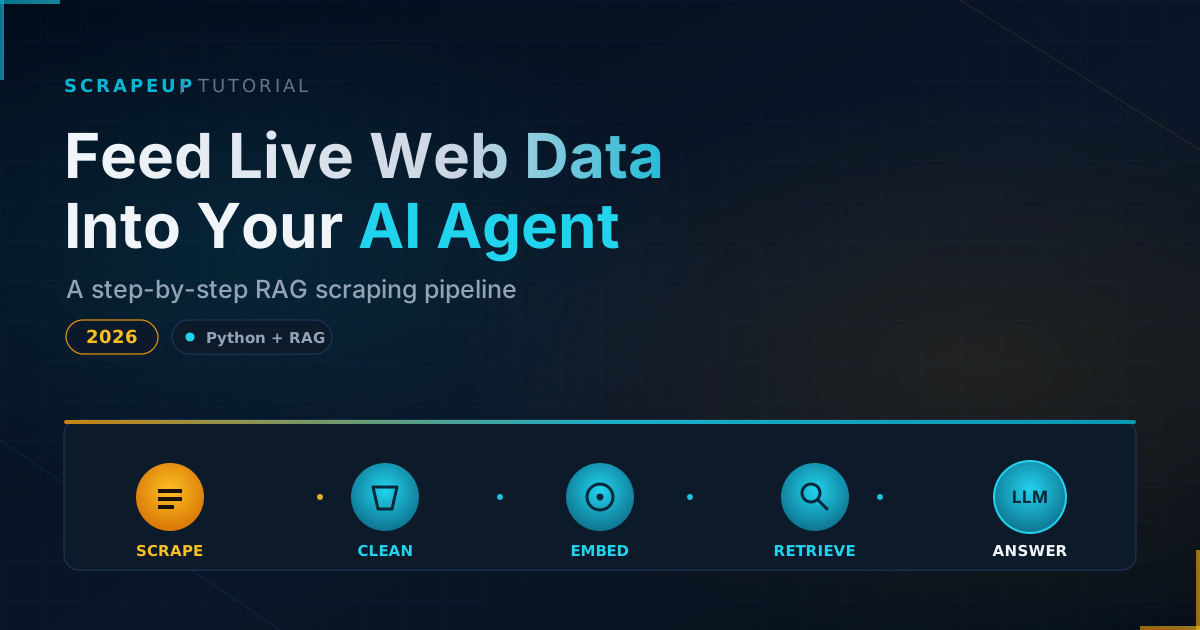
The 2026 RAG-scraping pattern, in one picture
Strip away the jargon and every live-data RAG system is the same five steps:
- Scrape the target page and convert it to clean, token-optimized text (markdown is ideal).
- Chunk that text into retrieval-sized pieces.
- Embed each chunk into a vector and store it in a vector database.
- Retrieve the most relevant chunks for a user's question.
- Augment the LLM's prompt with those chunks so it answers from real, current data.
The thing nobody tells you up front: steps 2 through 5 are largely solved and boring. The part that breaks in production is step 1. We'll build all five, then talk honestly about why scraping is the step that bites.
Setup
You'll need Python 3.10+ and a handful of packages. We'll keep dependencies light so the concepts stay visible.
pip install requests beautifulsoup4 markdownify openai chromadbSet your OpenAI key (or swap in any embedding + chat provider you prefer):
export OPENAI_API_KEY="sk-..."Step 1: Scrape the page as clean markdown
LLMs work best with clean, structured text — not raw HTML full of nav bars, scripts, and tracking pixels. So we fetch the page, strip the noise, and convert what's left to markdown.
import requests
from bs4 import BeautifulSoup
from markdownify import markdownify as md

def scrape_to_markdown(url: str) -> str:
    resp = requests.get(url, headers={"User-Agent": "MyAgent/1.0 (+https://example.com/bot)"}, timeout=20)
    resp.raise_for_status()

    soup = BeautifulSoup(resp.text, "html.parser")
    # Drop the parts that are never useful context
    for tag in soup(["script", "style", "nav", "footer", "header", "aside"]):
        tag.decompose()

    main = soup.find("main") or soup.find("article") or soup.body
    return md(str(main), strip=["a"]).strip()

text = scrape_to_markdown("https://example.com/some-article")
print(text[:500])
Notice the honest User-Agent that points to a crawler-policy URL. That's not just politeness — it's a 2026 best practice that keeps you on the right side of site owners and emerging compliance rules. (More on that below.)
Step 2: Chunk and embed into a vector store
An entire page is too big to embed as one vector and too coarse to retrieve precisely. So we split it into overlapping chunks, embed each, and store them in a vector database. We'll use Chroma because it runs locally with zero setup.
import chromadb
from openai import OpenAI

client = OpenAI()
db = chromadb.Client()
collection = db.create_collection("web_data")

def chunk(text, size=800, overlap=100):
    words = text.split()
    step = size - overlap
    return [" ".join(words[i:i+size]) for i in range(0, len(words), step)]

def embed(texts):
    resp = client.embeddings.create(model="text-embedding-3-small", input=texts)
    return [d.embedding for d in resp.data]

chunks = chunk(text)
collection.add(
    ids=[f"chunk-{i}" for i in range(len(chunks))],
    documents=chunks,
    embeddings=embed(chunks),
)
print(f"Stored {len(chunks)} chunks.")
Step 3: Retrieve and augment the LLM
Now the payoff. When a question comes in, we embed it, pull the most similar chunks, and stuff them into the prompt as grounding context.
def ask(question: str) -> str:
    q_embedding = embed([question])[0]
    results = collection.query(query_embeddings=[q_embedding], n_results=3)
    context = "\n\n".join(results["documents"][0])

    prompt = f"""Answer using ONLY the context below. If the answer isn't there, say so.

Context:
{context}

Question: {question}"""

    resp = client.chat.completions.create(
        model="gpt-4o-mini",
        messages=[{"role": "user", "content": prompt}],
    )
    return resp.choices[0].message.content

print(ask("What is the main point of the article?"))
That's a working RAG pipeline over live web data. Point scrape_to_markdown at the pages your agent needs, refresh on a schedule, and your model answers from current reality instead of stale training data.
Why the hard part isn't the RAG — it's the scraping
Run the code above against a friendly blog and it just works. Run it against the sites your business actually cares about and you'll hit a wall fast. Here's what production scraping throws at you that the tutorial version ignores:
- JavaScript rendering. A huge share of modern sites render content client-side.
requestssees an empty shell; you need a real browser engine. - Anti-bot defenses. CAPTCHAs, TLS fingerprinting, and rate limiting will quietly start returning garbage or blocks once you scale past a trickle.
- Structure drift. Sites change their markup constantly, and brittle scrapers break silently — poisoning your RAG store with empty or wrong context.
- Compliance. In 2026 you're expected to read and respect
robots.txt, machine-readable opt-outs, and crawler policies. A good pipeline checks these before it fetches deep links, not after. - Scale and freshness. Keeping thousands of pages current means scheduling, retries, deduplication, and monitoring — an infrastructure project of its own.
This is the gap between a tutorial and a system. The five lines that scrape one page become a standing service that has to be reliable, polite, and always-on. You can build and babysit that yourself, or you can treat scraping as a managed layer and spend your time on the agent instead.
That's exactly the layer ScrapeUp handles: it returns clean, LLM-ready text from the messy real web — rendering JavaScript, handling anti-bot, respecting opt-outs — so the scrape_to_markdown step in your pipeline becomes a single reliable API call. If the "why the hard part is scraping" section felt a little too real, that's the problem ScrapeUp exists to remove.
Your production RAG-scraping checklist
Before you ship a live-data RAG pipeline, run it against this list. We put together a fuller, copy-pasteable version (plus the complete code from this tutorial) you can keep on hand:
- Render JavaScript where needed — don't trust raw HTML.
- Check
robots.txtand machine-readable opt-outs before fetching deep links. - Send an honest
User-Agentwith a link to your crawler policy. - Rate-limit and back off; never hammer a host.
- Validate extraction — catch empty or malformed chunks before they reach your vector store.
- Deduplicate and timestamp chunks so retrieval favors fresh data.
- Re-scrape on a schedule that matches how fast the source changes.
- Monitor for structure drift and silent failures.
Want the complete code and the full checklist as a download? Subscribe and we'll send it over — it's the fastest way to get a clean starting point you can drop into your own stack.
What's next
This was Part 1: the core pipeline. In Part 2 we'll turn this from a one-page demo into an autonomous agent that decides what to scrape on its own — wiring live web data into an agent via the Model Context Protocol (MCP) so it can fetch fresh context mid-conversation. Subscribe so you don't miss it.
FAQ
What is RAG over web data?
RAG (retrieval-augmented generation) over web data means scraping live web pages, storing them in a searchable vector database, and retrieving the relevant pieces to feed your LLM at query time. It lets an AI agent answer from current information instead of its frozen training data.
Why not just fine-tune the model on the data?
Fine-tuning bakes data in permanently and is expensive to repeat. RAG keeps data external and fresh — you re-scrape and re-embed as the source changes, which is far cheaper and faster for information that updates often, like prices, news, or docs.
What's the hardest part of building a web-data RAG pipeline?
The scraping. Retrieval and generation are largely solved by off-the-shelf libraries, but reliably extracting clean text from JavaScript-heavy, anti-bot-protected sites at scale — while staying compliant — is where most projects stall. Many teams use a managed scraping API like ScrapeUp for this layer.
Is scraping for AI agents allowed?
Scraping public data is generally fine when done responsibly: respect robots.txt and machine-readable opt-outs, identify your crawler, rate-limit, and focus on public, non-protected content. Bypassing anti-bot protections or ignoring opt-outs is where legal risk lives.
Looking for the full code and a production checklist? Subscribe to get it, and stay tuned for Part 2 on MCP-powered agents.