How to Give Your AI Agent Live Web Access: Build a Web Scraping MCP Server in Python
Your agent can reason about a web page beautifully — it just can't get one. Here's a complete MCP server in Python that gives Claude, Cursor, or any agent live, unblocked web access, with a cost-escalation ladder that stops it burning your budget.
Your agent can reason about a web page beautifully. It just can't get one.
That gap is the quiet failure mode behind most agent demos that look great on stage and fall apart in production. The model is fine. The retrieval is fine. What breaks is the two hundred milliseconds where something has to actually go out, fetch a live URL, get past whatever is guarding it, and hand back text the model can read. Give an LLM a raw fetch() and it will confidently summarize a Cloudflare challenge page for you.
The Model Context Protocol fixed the plumbing problem — one server, any client. It did not fix the access problem. This post covers the second half: building an MCP server in Python that gives Claude, Cursor, or any agent framework live, unblocked access to any page on the internet, with cost controls that stop it from spending your budget on a loop.
Working code, about forty lines. Let's go.
Why not just give the agent requests?
This is the first thing everyone tries, and it's worth understanding exactly why it fails, because the failure is silent.
The bot wall. Cloudflare, DataDome and Akamai now sit in front of a large share of the commercially interesting web. Your agent doesn't get an error — it gets a 200 response containing a challenge page, and cheerfully treats that HTML as the answer. We've written before about what it actually takes to get past Cloudflare, and the short version is that it is not a header you can add.
The JavaScript wall. A large fraction of modern sites ship an empty shell and hydrate client-side. requests.get() returns a <div id="root"></div> and the agent concludes the page has no content.
The token wall. This is the expensive one and nobody talks about it. A typical product page is 400KB of HTML — call it 100,000 tokens of nav bars, tracking pixels, inline SVG and minified CSS to retrieve maybe forty tokens of actual answer. Do that across a ten-step agent run and you've burned your context window and a meaningful amount of money to learn one price.
Any one of these turns your agent into a confident liar. Together they're the reason "just let it browse" doesn't survive contact with real users.
What MCP actually changes
MCP is a thin standard for exposing tools to a model over stdio or HTTP. The value isn't the protocol itself — it's that you write the hard part once.
Build web access as an MCP server and the same server works in Claude Desktop, Cursor, Windsurf, your LangChain agent and whatever ships next quarter, with no adapter code. More importantly, the tool boundary is where you get to put judgment. The model doesn't decide how to fetch a page; it decides whether to, and how hard to try. You own everything on the other side of that line: retries, proxy strategy, output format, cost ceilings.
That separation is what makes the thing safe to hand to an autonomous loop.
What we're building
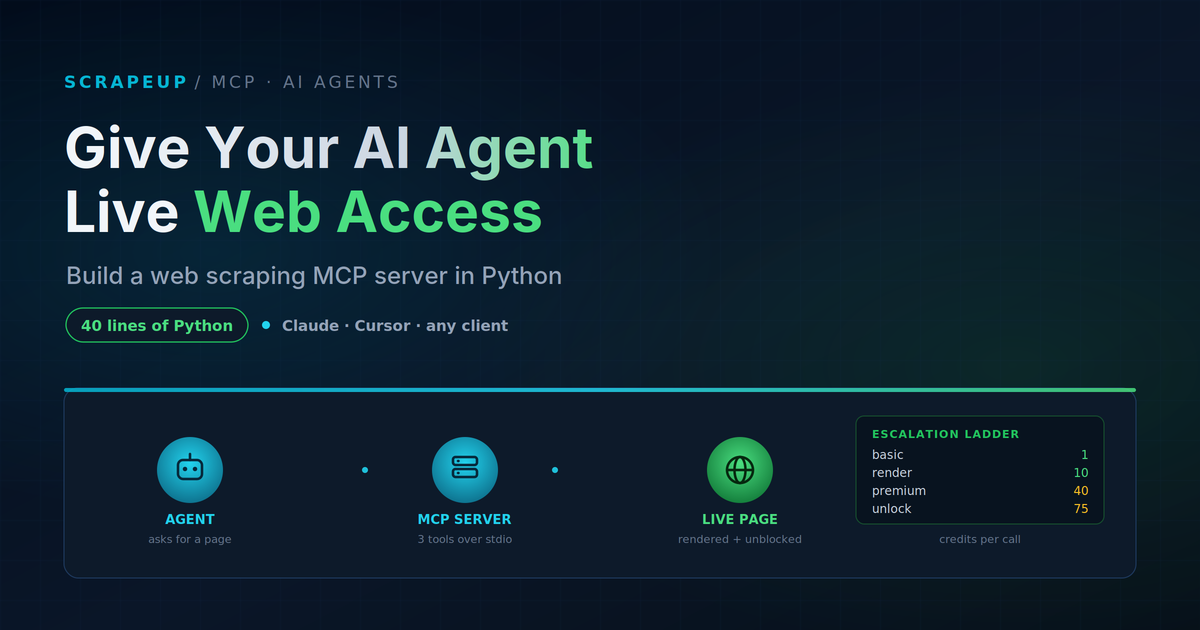
Three tools, deliberately few:
read_page— returns a page as clean markdown instead of raw HTML, with an explicit escalation ladder for hard targetsextract_data— returns structured JSON straight off the page, so the model never sees the HTML at allcheck_credits— lets the agent see its own remaining budget
The escalation ladder is the part worth stealing even if you build the rest yourself. Most scraping stacks pick one access strategy and apply it to every request, which means you either pay premium prices to read a blog post or fail on anything defended. Exposing the ladder to the model — and telling it what each rung costs — lets it start cheap and escalate only when the cheap path visibly fails.
Step 1: Prerequisites
uv add "mcp[cli]" httpx
# or: pip install "mcp[cli]" httpx
You'll need a ScrapeUp API key — the free trial is 25,000 credits, which is several thousand basic fetches and plenty to build against. Export it:
export SCRAPEUP_API_KEY="your_key_here"Step 2: The server
The whole thing, in one file. Save it as scrapeup_mcp.py:
"""ScrapeUp MCP server — live, unblocked web access for any MCP client."""

import os
import httpx
from typing import Literal
from mcp.server.fastmcp import FastMCP

API = "https://api.scrapeup.com"
KEY = os.environ["SCRAPEUP_API_KEY"]

# Escalation ladder: cheapest access level first.
ACCESS = {
    "basic":   {},                                    # 1 credit
    "render":  {"render": True},                      # 10 credits
    "premium": {"premium": True, "render": True},     # 40 credits
    "unlock":  {"unlock": True, "render": True},      # 75 credits
}

mcp = FastMCP("scrapeup")


def _call(payload: dict) -> dict:
    payload["api_key"] = KEY
    r = httpx.post(API, json=payload, timeout=120.0)
    if r.status_code != 200:
        raise RuntimeError(f"ScrapeUp {r.status_code}: {r.text[:200]}")
    return r.json()


@mcp.tool()
def read_page(
    url: str,
    access: Literal["basic", "render", "premium", "unlock"] = "basic",
    output: Literal["markdown", "text", "html"] = "markdown",
) -> str:
    """Fetch a web page as clean text the model can actually read.

    Start with access="basic" (1 credit). If the result looks like a bot
    wall, a consent screen, or an empty shell, retry one rung up the
    ladder: render (10), then premium (40), then unlock (75).
    """
    data = _call({"url": url, "output": output, **ACCESS[access]})
    body = data.get("body", "")
    used = data.get("credits_used", "?")
    return f"[credits_used={used}]\n\n{body[:120_000]}"


@mcp.tool()
def extract_data(
    url: str,
    fields: dict[str, str],
    access: Literal["basic", "render", "premium", "unlock"] = "basic",
    model: Literal["fast", "balanced", "precision", "ultra"] = "balanced",
) -> dict:
    """Pull structured JSON off a page without spending tokens on raw HTML.

    `fields` maps each key you want back to a plain-English description,
    e.g. {"price": "current price in USD", "in_stock": "true or false"}.
    """
    data = _call({
        "url": url,
        "extract": fields,
        "extract_model": model,
        **ACCESS[access],
    })
    if data.get("extracted") is None:
        raise RuntimeError(f"Extraction failed: {data.get('extraction_error')}")
    return {"data": data["extracted"], "credits_used": data.get("credits_used")}


@mcp.tool()
def check_credits() -> dict:
    """Report remaining credit balance so the agent can budget its own work."""
    r = httpx.get(f"{API}/account", params={"api_key": KEY}, timeout=30.0)
    r.raise_for_status()
    return r.json()


if __name__ == "__main__":
    mcp.run()
Two design choices in there are doing most of the work.
The first is that the docstrings are written for the model, not for a human reading the repo. The model has never seen your API. The docstring is the entire spec it gets, and "retry one rung up the ladder if the result looks like a bot wall" is the difference between an agent that recovers and one that gives up on the first defended page.
The second is that read_page returns markdown by default. That single parameter typically cuts the payload by 80–95% versus raw HTML, which is the token wall from earlier, solved. Returning credits_used inline also gives the model live feedback on what its choices cost — surprisingly effective at keeping it on the cheap rungs.
Step 3: Wire it into your client
For Claude Desktop, edit claude_desktop_config.json:
{
  "mcpServers": {
    "scrapeup": {
      "command": "uv",
      "args": ["run", "--with", "mcp[cli]", "--with", "httpx",
               "python", "/absolute/path/to/scrapeup_mcp.py"],
      "env": { "SCRAPEUP_API_KEY": "your_key_here" }
    }
  }
}
Restart the client. Cursor and Windsurf take the same block in their own MCP settings; that's the point of the protocol. To test before wiring anything up:
uv run mcp dev scrapeup_mcp.pyThat opens the inspector, where you can call each tool by hand and see exactly what the model will see.
The credit ladder, and why you expose it
Here's what each rung costs and when the agent should reach for it:
| Rung | Credits | Use when |
|---|---|---|
basic | 1 | Static HTML, docs, blogs, most public data. Always try this first. |
render | 10 | Result came back as an empty shell — SPA, client-side hydration. |
premium | 40 | Datacenter IPs are being refused; needs residential. |
unlock | 75 | Serious anti-bot. Last resort. |
Extraction adds 5–15 credits on top depending on model tier (fast through ultra), and failed requests aren't charged.
The spread here is 75x. An agent that defaults to the top rung burns your month in an afternoon; one that starts at the bottom and escalates on evidence costs almost nothing on the 90% of pages that aren't defended. If you're weighing schema-driven extraction against writing selectors yourself, we broke that trade-off down in LLM extraction vs CSS selectors.
Guardrails before this touches production
The version above is honest starter code. Four things to add before you let an autonomous loop near it:
A hard credit ceiling per session. Agents retry. A loop that escalates to unlock and retries eleven times is a real bill. Track spend in a module-level counter and raise once it crosses your limit — the model will read the error and stop.
A domain allowlist. If your agent only ever needs three domains, enforce that in the tool rather than in the prompt. Prompt-level restrictions are suggestions; code-level ones are not. This also protects you when a page the agent reads contains text trying to talk it into fetching something else.
Real error surfaces. ScrapeUp returns plain-text bodies on auth failures, not JSON, so a naive .json() throws an opaque decode error and the model learns nothing. The _call helper above passes the status and body straight through, which lets the agent distinguish "wrong key" from "quota exhausted" from "site is down" and react differently to each.
A response size cap. The [:120_000] slice isn't cosmetic. Responses can run to several megabytes, and one unguarded page can blow the context window mid-run.
Most of what separates a demo from something you can leave running is unglamorous — retries, budgets, timeouts, observability. We catalogued the full set in how companies keep important scrapers reliable.
The failure modes you'll actually hit
The agent stays on basic and reports nonsense. It fetched a challenge page and summarized it. Fix in the docstring: describe what a bot wall looks like concretely, so the model can recognize one.
The agent jumps straight to unlock. Usually because the ladder isn't described as a ladder. Naming the rungs in cost order and stating the costs in the docstring fixes it more reliably than any system prompt.
Extraction returns null. Almost always the page didn't render, not that the model failed. Escalate access before you escalate extraction tier — fast on a rendered page beats ultra on an empty shell every time.
Timeouts on heavy pages. The 120-second client timeout is deliberate; rendering plus residential proxying is genuinely slow. Anything lower and you'll fail perfectly good requests.
Where this goes next
Once an agent can read any page reliably, the interesting work stops being retrieval and starts being what you point it at. A research agent that reads primary sources instead of a stale index. A monitoring agent that checks a set of pages on a schedule and only speaks up when something changed. A pipeline that turns pages into a corpus your agent can actually reason over — which we walked through end-to-end in RAG scraping for AI agents.
The pattern underneath all of them is the same: the model does the reasoning, the tool does the access, and the boundary between them is where you put your judgment about cost and risk.
Get started
The server above is complete and runnable — copy it, add a key, and your agent has the live web in about five minutes. The free trial gives you 25,000 credits, no card required, which is enough to build and stress-test the whole thing before you decide anything.
If you're wiring this into something real and want a second set of eyes on the architecture, the team is at sales@scrapeup.com.